Fake CAPTCHAs: Malware on the Blockchain
TL;DR
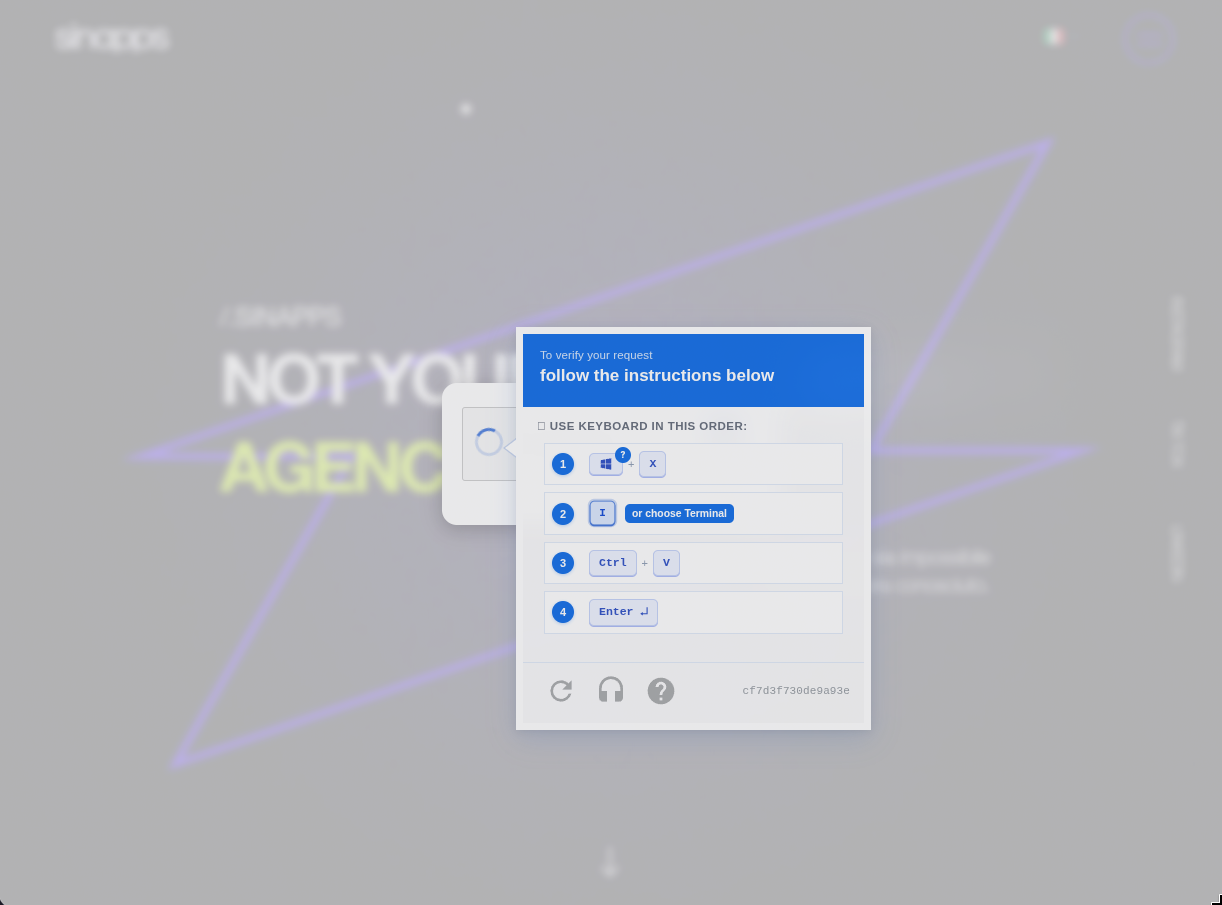
During this investigation I found the same fake-CAPTCHA campaign across multiple websites. The confirmed set included both WordPress and non-WordPress sites. Visitors were instructed to paste a command into Windows, and some sites used a public blockchain to control what happened next. That made the campaign unusually easy to update and difficult to block.
Malware Analysis
I was able to dig this deeply into these incidents thanks to my friends at Horizon Comunicazione.
A Wider Campaign
This was a ClickFix campaign. Instead of exploiting a browser bug, the attackers tried to persuade visitors to compromise their own computers. A convincing Google-style CAPTCHA filled the page, copied a hidden command to the clipboard, and then explained how to open a Windows prompt and paste it. The checkbox was not checking anything: it was the first step of the infection.
The affected websites did not all use the same publishing system. At least one confirmed case did not use WordPress at all. The fake CAPTCHA was therefore not a WordPress-specific threat. WordPress was simply one of the ways the attackers gained a foothold and hid their code.
Three sites offered enough access and evidence for a deeper investigation: an agency, a retailer, and a broadcaster. Those are the representative cases covered below. The agency's site fetched the next stage from an address written directly into the page. The retailer's site asked a smart contract on Polygon where to find it. The broadcaster's site went further: a contract on Base held the attack code itself, together with an on/off switch the operator could flip with one transaction.
EtherHiding, in Plain English
Think of the smart contract as a public noticeboard. A compromised website can read it without a wallet or payment, and the attacker can change the message later without touching the website again. A normal malicious server can be suspended or its domain blocked. Information stored on a blockchain is copied across many independent systems, so there is no single server to take down. This technique is known as EtherHiding.
How the Attack Worked
Compromise the Website and Hide
The attackers first needed a way to add code to each site. In the WordPress cases, fake plugins provided that foothold; one even pretended to be the well-known Akismet plugin. The non-WordPress case shows that the wider campaign was not tied to one platform. The code avoided administrators and appeared only on some visits, helping it remain unnoticed.
Fetch the Instructions
The small piece hidden in the page did not contain the full attack. It fetched the next part from elsewhere. On the later sites, the location or code came from a blockchain, allowing the attackers to change it remotely.
Show a Fake CAPTCHA
The page displayed a full-screen copy of a Google security check, complete with invented technical details to make it feel genuine. It was deliberately difficult to close, and one version also blocked common shortcuts used to open developer tools.
Turn the Visitor Into the Installer
Clicking the checkbox copied a command and revealed instructions for running it. Nothing exploited the browser directly. The attack worked only if the visitor followed the instructions, but the fake CAPTCHA made those steps look like a routine verification.
Download the Malware
The pasted command started a chain of hidden downloads. Each step unpacked the next until the computer received a password-protected archive containing a legitimate application as a decoy and malware disguised as one of its support files.
The Agency Site: Following the Chain
The first report was simple: some Windows visitors were seeing an "I'm not a robot" check that asked them to run a command. A script had been inserted into the page, but it blended in because the site's performance plugin rewrote all scripts in the same way. The attacker's code inherited that disguise for free.
Decoding the script revealed the fake CAPTCHA and a series of downloads, each hiding the next. The links were single-use, which made them harder to study: opening one during analysis could consume it before it was inspected again. The final download was a large archive containing 737 files.
Most of those files belonged to a real open-source volume-control application. Launching that legitimate program gave both the victim and a hurried analyst something harmless to see. The suspicious file was hidden among the application's visual themes. Normal theme files were around 100 KB; this one was more than 14 MB and was actually a Windows executable wearing the wrong extension. Static analysis showed more hidden data inside it, but determining its final behavior would have required running it, which was outside the scope of this investigation.
The Retailer Site: the Address on Polygon
This investigation began with a false lead. A scanner had flagged a theme file, but that file was not the source of the malware. The real compromise appeared in deleted media uploads: three identical archives, uploaded on different days under innocent-looking names. Each contained a fake plugin impersonating Akismet.
The plugin hid itself from the WordPress Plugins screen and refused to run for administrators. For ordinary visitors, it asked a smart contract on Polygon for the attacker's current server address and then loaded the next stage from there. The request pattern matched the agency incident, linking the two attacks even though the affected sites had nothing else in common.
Access to the site's logs later revealed the likely entry point. A legitimate content-author account signed in from a commercial server in Berlin just 21 seconds before one of the malicious uploads. No account on the site had two-factor authentication. The evidence pointed to a stolen password, not an exotic WordPress vulnerability.
Cleanup exposed one useful trap. Removing the malicious plugin from the database did not immediately stop it because Redis still held an old copy of the active-plugin list. Flushing the object cache finally removed the stale entry. Deleting the right database row is not enough if a cache continues serving the old value.
The Broadcaster Site: a Remote Switch on the Blockchain
The broadcaster had suffered a related compromise months earlier and had since rebuilt the site. By August, however, a new fake plugin was in place. It had a random-looking name, bundled the software needed to read the Base blockchain, and stayed dormant until a preset date.
This version treated the smart contract like a remote control panel. The contract contained several modules that could be enabled or disabled independently. When I captured it, the fake-CAPTCHA module was switched off while another module was collecting basic information about visitors, including their browser, operating system, device type, and country. That collection request triggered the alert that started the investigation.
The disabled CAPTCHA was still present and ready to use. The operator could bring it back with a single blockchain transaction, without changing the WordPress site. That is the most important difference from the first incident: the compromise was no longer just a fixed malicious script. It was a remotely managed platform.
Why a Clean Homepage Proves Nothing
A quick scan can miss this campaign for three independent reasons:
- The malicious code appears only on some visits. Requests from scanning services or visitors with the wrong browser profile may receive the normal page.
- In two of the three in-depth cases, important parts of the attack lived on a blockchain rather than on the compromised site. A clean-looking file system therefore did not tell the whole story.
- The broadcaster's version was controlled by a timer and remote switches. It could look harmless during one visit and become active later without any local file changing.
What Site Owners Should Do
- Inspect the website from the server, not only through its admin panel. On WordPress, a malicious plugin can hide itself from the dashboard. Review recent uploads, unfamiliar extensions, user accounts, and login history.
- Check the site while logged out, using a normal browser and more than one network. Conditional malware may deliberately serve clean pages to administrators and automated scanners.
- Rotate website, hosting, and file-transfer credentials, remove unused accounts, and enable two-factor authentication wherever possible.
- After removing malicious database entries, flush Redis, Memcached, and any page caches so stale configuration cannot keep the infection alive.
- If anyone followed the fake CAPTCHA's instructions, treat that computer as compromised. Isolate it and perform a full endpoint investigation; deleting a downloaded file is not enough.
Takeaway
The initial compromise was ordinary: a stolen password, a fake plugin, and code hidden from administrators. The delivery method was not. A fake CAPTCHA persuaded visitors to run the malware themselves, while a blockchain let the attackers change or reactivate it without revisiting the site. The practical lesson is simple: a website never needs you to paste a command into Windows to prove that you are human.